Showing posts with label Google Tools. Show all posts

Wednesday, December 29, 2010

Google Sky Map – Search for Stars and Planets

Google Sky Map turns your Android-powered mobile phone into a window on the night sky. It will identify objects that appear in the sky and allow users to search for them. Over one thousand stars and all of the planets in our solar system are searchable and visible in the app. Users can also view and search for constellations and individual stars. Point your phone at the sky, and Google Sky Map will show the stars, planets, constellations,  and more to help you identify the celestial objects in view. You can also browse the skies in manual mode. Search the night sky for your favorite planet, Messier object, and more. Then move the phone in the direction of the arrow to find it in the sky around you.

The app uses Android-powered devices’ built-in compass, GPS, and clock to display an annotated
Sky Map of the area it is facing. The map will adjust as the user moves the device. If a device
is released that does not have a compass, the app will work only in manual mode.

Sky Map automatically adjusts to identify on the device’s screen the objects it is facing.
Users can zoom in and out, and switch various layers such as constellations, planets, grids,
and deep sky objects, on and off, choosing to make these elements visible or not. Users can
also determine the locations of planets and stars relative to their own current locations with the search function.

A user could search for Polaris and orient themselves according to the current location of the North star.
Inputting the name of a planet or star will direct users towards this object. A user may also explore the
cosmos manually and move through the sky by touching the screen instead of having it adjust automatically.

Google Sky Map is supported in all Android phones running Android 1.6 or higher.

Scan QR Code to install Google SKy Map in your Android Phone.

Saturday, December 18, 2010

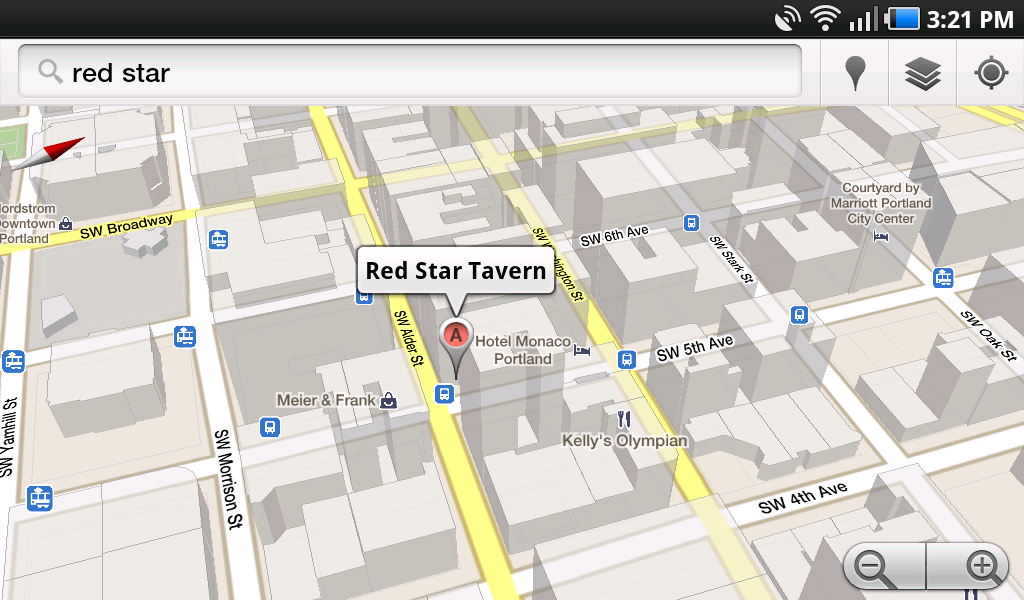
3D map view and offline Navigation with Google Maps 5.0


The new Google Maps 5 may have changed the way we use our phones for the foreseeable future with the new set of features that came with it. Your Maps app will now display 3D versions of cities, load faster, cache maps for offline viewing, and even allow you to navigate without a connection. It’s pretty amazing stuff and Google wants you to know more about it. Today, they released the secret behind this amazing new app, which they are calling “vector graphics.” source: listandroidapps

Google's never been afraid to "blow it out" with Google Maps, most famously with its inclusion of Navigation, which knocked the legs out from under a lot of the GPS device and navigation app market.Google Maps 5.0 for Android might seem similarly earth shattering, but it marks a significant change to the basic technology of Google Maps. Most importantly, Google is now using vector graphics for its maps, which are scalable and much lighter weight than the traditional stitched together images used in most Google Maps incarnations. The vectors also enable something else a whole lot sexier: a two finger swipe can "tilt" the map and now you've got a 3D view of the landscape. It's not quite as flashy as Google Earth, but it looks a whole lot more useful. The other thing these low-bandwidth vector maps enables is offline caching of maps, specifically your most frequently visited locations, and entire trips that have been routed in Navigation, including potential reroutes. Anybody with an Android 1.6 or higher device can download 5.0 right now for free, but the 3D and offline features are 2.0+ only. source: engadget

Google Maps 5.0 for Android

Thursday, December 16, 2010

Google's Spirit of Time for 2010

Zeitgeist is "the spirit of the times" or "the spirit of the age.". Zeitgeist is the general cultural,intellectual, ethical, spiritual, and/or political climate within a nation or even specific groups, along with the general ambience, morals, sociocultural direction, and mood associated with an era. source: wikipedia

The term zeitgeist is from German Zeit- 'time' (cognate with English tide and "time") and Geist- 'spirit' (cognate with English ghost, without being really translatable into English - this is why the German term is used).

"Zeitgeist" means "the spirit of the times", and Google reveals this spirit through the aggregation of millions of search queries we receive every day. We have several tools that give insight into global, regional, past and present search trends. These tools are available for you to play with, explore, and learn from. Use them for everything from business research to trivia answers.

The world's number one search engine giant said, "Based on the aggregation of billions of search queries people typed into Google this year, Zeitgeist captures the spirit of 2010."
source: Google

Now while 2010 is about to end, you can find out what people were searching most of the time online through Google search engine.... What trends are going up word and what searches are going down fast...

To get more general search trends you may also visit Google's other sites like:

  • Google Trends - For a broad look at search query data, enter up to five search terms to see relative popularity over time.
  • Trends for Websites - Google Trends for website traffic data. Type in a website address to see visitors by region and related sites visited.
  • Insights for Search - A deeper dive into search query data for marketers and power users. Create your own lists of "most popular" and "fastest rising" queries for different geographic regions over time and by topic.
  • Hot Trends - The top 100 fastest-rising search queries right now (U.S. only). Updates throughout the day.

Google Fiber Coming to One Lucky Community in 2011

Google’s ambitious high-speed Internet project, Fiber, will be coming to one of more than 1,100 applying communities sometime in early 2011.
The company was to announce the lucky community by the end of this year; however, the demand to be part of the Fiber project was so great that plans have been slightly postponed.
Fiber was announced back in February. The project had the search giant venturing into ISP territory by delivering broadband to between 50,000 and 500,000 users — and broadband such as the world has not yet seen, reportedly around 100 times faster than typical Internet access.
The goal was to create an at-scale testing ground for better, faster web apps. An unintended consequence was the rush of pitches from communities around the United States. One city even changed its name to Google to better its chances of getting Fiber. By March, more than 600 communities had applied.
Now, with almost double that number of applying communities, Google is finding it needs a bit more time to choose the right environment for Google Fiber. The application process is closed, but the selection process is being extended into the beginning of next year.
Here’s a map of communities that have applied. The small beige dots represent governments that have applied, and the large brown dots represent communities where more than 1,000 residents have applied.


Google Fiber has already been implemented in around 850 homes of staff and faculty at Stanford University. Google says this trial is showing broadband speeds of up to one gigabit per second.
source: Mashable

Wednesday, December 15, 2010

Google Voice App brings free texting to your iPod Touch


Google Voice is a terrific service. If you haven’t looked into it by now, I highly recommend it. I won’t go and list all of the things it can do for you, but I am excited to see that the service has official support for the iPod Touch and iPad now. So why exactly would you want a phone service on a device that isn’t a phone? Free texting. That’s why.

Lets say that you don’t have unlimited texting on your phone, but you spend a lot of time around a WiFi connection. If the texts are being sent to your Google Voice number, you’ll get a push notification on your iPod Touch. You can then send a response just as you would on a phone. Text messages are extremely overpriced (for the amount of data transmitted) so I feel no remorse in taking advantage of this.
Sourece: http://www.redferret.net/

Saturday, December 11, 2010

A new tool from Google: Backup your Emails with Gmail


When the Microsoft Exchange is under maintenance, cloud-based enterprise solution will back up your corporate e-mail. Google’s new launch Message Continuity will facilitate this feature.

The new product is powered by Postini the new acquisition of Google in 2007 and its main aim is on giving companies a different access point to their e-mail accounts. It basically creates a total backup copy of Microsoft Exchange Servers and puts those e-mails into a Google Apps account, replicating that information within Gmail, Calendar and Contacts.

The expectation is that when a company’s e-mail servers go down, it will be able to boot up Google’s cloud-based solution and keep on its work devoid of any disruption. Google and Exchange are always coordinated to make sure Message Continuity is up-to-date. And because it’s cloud-based, the only way it goes down is if Google goes down.

It is not an easy endeavor by the search giant to get enterprises to toggle from Outlook to Gmail. According to the company’s blog post, “Since Microsoft Exchange and Gmail are always in sync with one another, there’s no need to migrate e-mail data when eventually deploying Google Apps,”

Google purchased Postini in 2007 for $625 million for its cloud-based e-mail technology. It’s the starting point for some of Google’s security features.